
Introducing NewsAPI.ai MCP: Structured News for Your AI Assistant
Connect your AI assistant to structured news research. Explore articles, follow events and measure coverage with NewsAPI.ai MCP using plain-language questions.

Updated 23 November 2026.
NewsAPI.ai MCP connects AI assistants such as Claude, Cursor and Codex to structured news search. It helps you research articles, follow events and measure news coverage using plain-language questions.
A useful news briefing needs reporting from the right period, a clear distinction between separate developments and repeated coverage, and sources you can follow. NewsAPI.ai MCP gives your assistant tools to find and examine that reporting in the news database developed and operated by Event Registry.
Use it to research a company, follow a policy debate, find reported acquisitions or recalls, or measure how much attention a topic receives. You can start with the hosted connection without installing a local server or pasting an API key.
What is NewsAPI.ai MCP?
NewsAPI.ai MCP is a server that makes NewsAPI.ai’s news search and analysis tools available to AI assistants through the Model Context Protocol (MCP).
MCP provides the connection between your assistant and an external service. NewsAPI.ai supplies the news data, search filters and enrichment. Your assistant uses those tools to gather information and write an answer.
The database covers more than 150,000 sources in 50+ languages. Alongside article content, it provides information such as publishers, publication times, recognised entities, topics and event relationships.
For you, the starting point is a question:
Use NewsAPI.ai to brief me on the latest news about [company, person or topic]. Focus on the last seven days and include source links.
Replace the brackets with a name or subject you follow.
You do not need to write an API query to get started.
What can your assistant research?
Different questions need different views of the news. NewsAPI.ai MCP supports three kinds of search - articles, events and mentions - plus aggregates for measuring coverage.
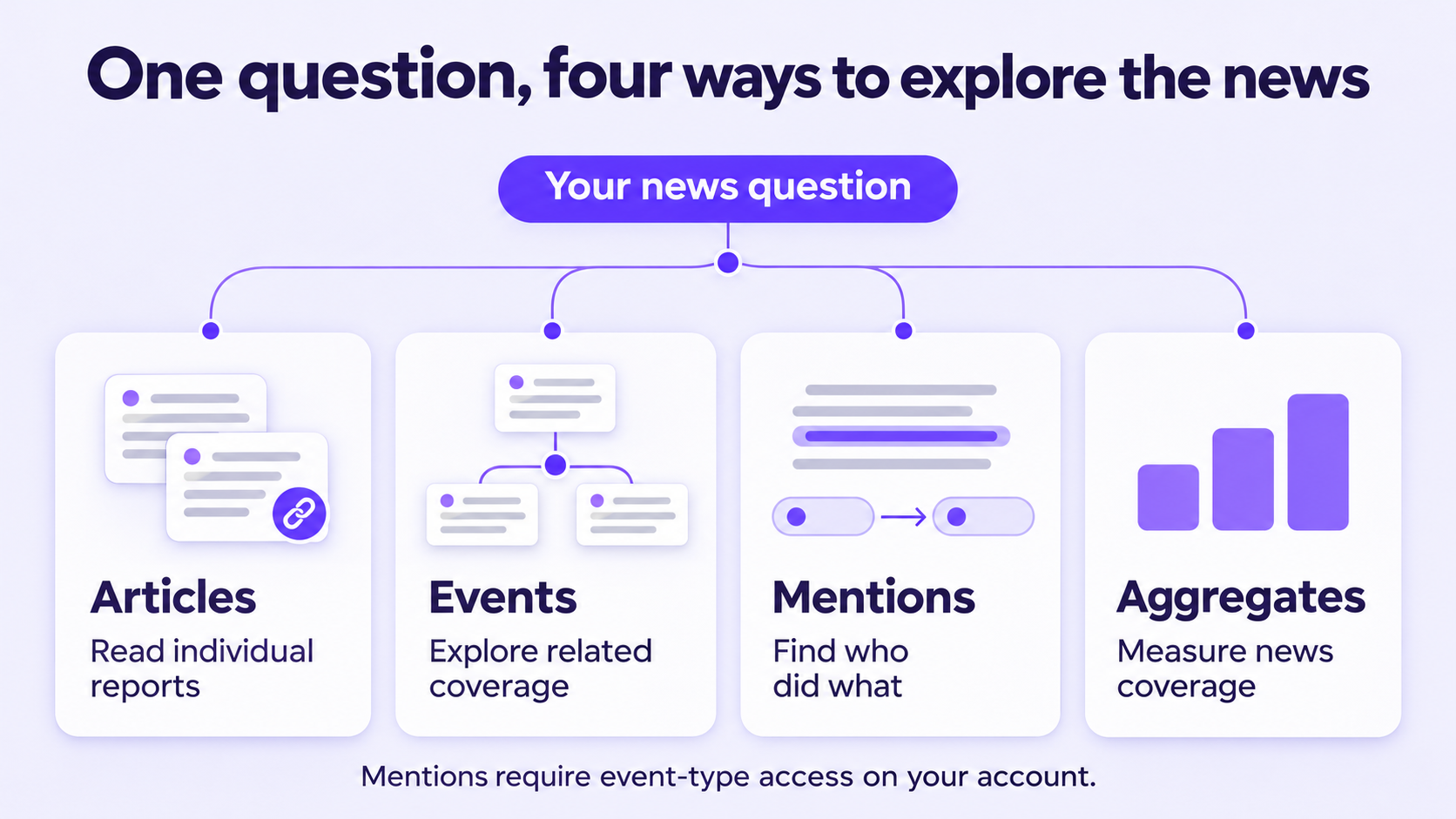
Articles: examine the reporting
Article search helps when you want to read about a specific company, topic or development, or focus on particular publishers, countries or languages.
An assistant can search for relevant coverage, review titles and retrieve the selected articles for closer analysis. Entity identifiers help distinguish the company or person you mean from other uses of the same name.
Try:
Use NewsAPI.ai to find reporting from German news sources about the European Central Bank over the last seven days. Summarise the main developments in English and link to the supporting articles.
Events: see the main developments
A widely covered story can generate many articles. Event search groups related reporting into clusters about the same real-world happening, helping the assistant work with distinct developments and their coverage.
This is useful for a company briefing, a sector overview or a review of the week’s major stories. A separate breaking-events tool surfaces events ranked by their breaking score.
Try:
Use NewsAPI.ai to identify the main events involving the European auto industry over the last seven days. Give me a short briefing with links to supporting reporting.
Mentions: find who did what
Some questions concern a particular kind of happening: an acquisition, a layoff announcement, a product launch or a recall.
Mention search returns sentences tagged with an event type, together with the entities involved and a link to the article. This gives the assistant a focused starting point for identifying reported actions. Mention search depends on event-type access being enabled for your account. If it is unavailable, the assistant can use concept-based article search to research the same question. That alternative may require additional searches and consume more API tokens.
Try:
Use NewsAPI.ai to find companies reported to have announced layoffs in the last seven days. For each, include the announcement date where available, a short description and a source link. Distinguish announced plans from completed cuts.
Aggregates: measure the coverage
When you want a count or distribution, the assistant can request an aggregate over the matching coverage. Supported aggregates include coverage over time, counts by source and sentiment distributions.
Try:
Use NewsAPI.ai to show the daily number of English-language articles about NVIDIA over the last seven days. Describe the pattern in coverage volume.
These numbers describe the matching news coverage. They do not, by themselves, measure public opinion or establish why an event happened.
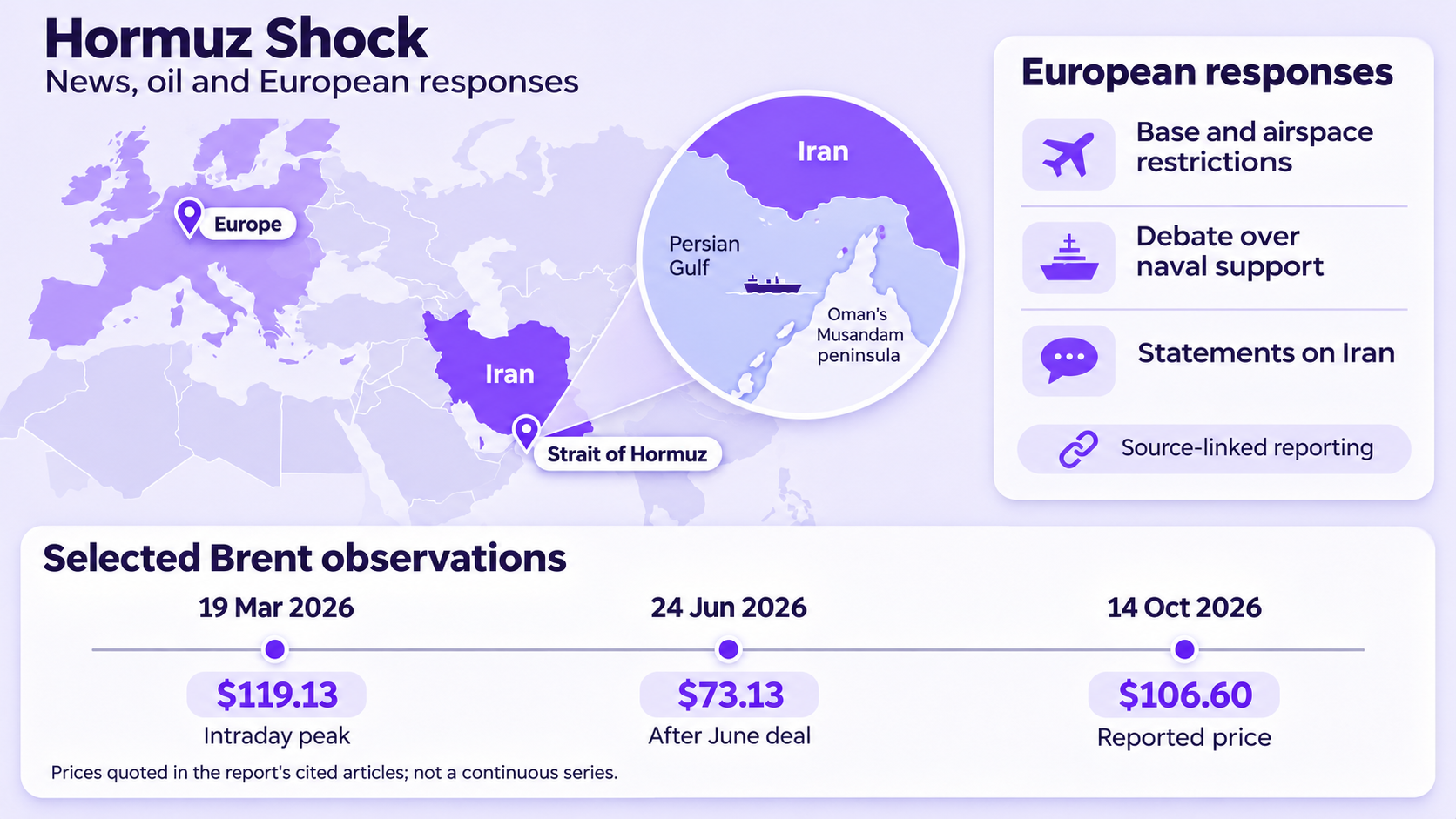
See a real research example: Hormuz Shock
How can an AI assistant turn months of news coverage into a research report you can explore?
Hormuz Shock brings together a sourced timeline of developments around the Strait of Hormuz, oil-price observations quoted in news reports, and European government responses. Readers can explore events on a timeline and map, then follow links to the supporting articles.
The research used NewsAPI.ai MCP to retrieve news coverage. The interactive report was built from that research.
Explore the full Hormuz Shock example →
You can apply a similar approach to a company announcement, a policy debate or supply-chain developments in a region you follow.
Keep the research focused
A useful request names the subject, period and scope. You can specify a publisher, sources based in a particular country, or a language. You can also ask the assistant to exclude known paywalled sources:
Use NewsAPI.ai to brief me on the EU AI Act over the last seven days. Ignore paywalled news. Give me five key developments, if available, with a source link for each.
The server applies its configured paywalled-source exclusion without requiring you to find a source-group identifier. Searches include all sources by default; the exclusion uses a curated source group, so individual link accessibility can still vary.
Without a date filter, searches default to the last 31 days. Naming the period makes the intended scope clear, especially for historical research.
How to connect NewsAPI.ai MCP
Start with the hosted server:
- Create a NewsAPI.ai account, which includes a free tier.
- In a compatible MCP client, add https://mcp.newsapi.ai/mcp as a remote server or connector.
- Complete the Event Registry login and authorise access when prompted.
- Start a chat and ask one of the questions above.
The hosted server requires a client that supports Streamable HTTP with OAuth login. The setup instructions cover Claude Desktop, claude.ai, Claude Code, Codex and Cursor.
If the assistant does not use NewsAPI.ai, check that the connector is connected and enabled for the chat, and explicitly ask it to use NewsAPI.ai.
Searches and detail lookups consume API tokens from your NewsAPI.ai account. Check token consumption in your account’s usage view. Historical research can cost more than recent searches; see the current plans and token rates.
Research skills and developer options
For more guided research, six optional Claude skills cover news, due diligence, risk, markets, political research and source analysis. They provide research procedures and report templates.
The Claude Code plugin bundles the hosted connection and these skills. Claude Desktop and claude.ai users can upload the skill packages separately. See the research skills guide for installation instructions.
Developers can also run the local server using Event Registry login or an API key. The server is open source under the MIT licence; self-hosting instructions are included in the repository.
Where it fits in your research
NewsAPI.ai MCP is built for exploring published news: finding reporting, separating developments, examining sources and measuring coverage. It is useful for market research, policy tracking, competitor monitoring and investigating reported business risks.
Other sources still matter. An official document, a company filing or a market-price dataset may be needed to verify a particular claim. News coverage provides evidence of what was reported; the assistant still needs to assess that evidence and link its conclusions to sources.
Start with a question you already need answered. Connect NewsAPI.ai, name the subject and period, and ask for a briefing with supporting links. For a closer look at the research process, continue with our practical guide to news research with NewsAPI.ai MCP.
Want to see how it compares with web search? Read our NewsAPI.ai MCP vs Web Search comparison for the results across four news-research questions.